

My Club Hub is here to transform the way you interact with your members, make your life easier, your club more professional and admin a thing of the past, with plenty of revolutionary updates to the British Taekwondo membership system,
We appreciate that these things take some time to get used to, so we have provided the following guides to help you along in your journey in the new system, covering everything you need to get your club up and running.
How-To Guides

An annual Club Product is any additional annual fee your club wants to add on top of the British Taekwondo membership. Adding a Club Product to your club’s account on My Club Hub streamlines the payment process, saving you time, reducing admin and improving the member experience.
How to renew a single membership on My Club Hub
Keep your club information up to date so new members can see what you offer
Click here to see how to accept members who are transferring clubs on My Club Hub
Click here to learn how to apply for a DBS or equivalent CRC on My Club Hub
Access Club Admin
Adding Smartlists
Adding/approving grades
Setting up Stripe links
Creating Club Product
Adding Coach Licence
Adding Club to Club Finder
Using the Club Product
Archiving Members
Adding a member as Club Admin
Renewing a membership first time
Club Roles
Please see the table below that helps to explain the club roles within each club, and the access each role can have on My Club Hub.
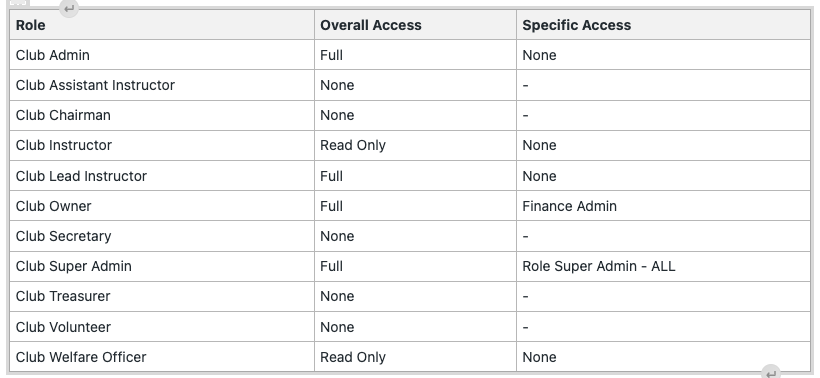
The ‘overall access’ column describes if the user can access the organisation they are associated with, and what they can do, with the different options represented as follows:
- Full – can switch into their organisation, view members who are linked, and can add or renew addons, such as adding or renewing a membership on behalf of a user. They will also be able to edit organisation information and add or renew organisation level add ons.
- Read Only – can switch in to the organisation, but cannot make any changes or edits, and can only view everything.
- None – no access, cannot switch in.
Regarding the ‘specific access’ column, this relates to areas of the Platform:
- Finance Admin
- Affiliations Admin (ability to block members from organisations)
- Reports Admin
Super Admins have access to all of the above, beyond that, these can be granted individually to specific role holders if needed.
FAQs
Please see the following Frequently Asked Questions to help you with your enquiry in My Club Hub
Each club should have a club super admin role. This person will have the ability to see everything from the club account, including financial reports. Please also set your club a primary contact.
Please raise a ticket in the 'Help and Support' section of My Club Hub, and we will deal with your enquiry as soon as possible.
The 'Help and Support' section is at the bottom of the page, and can be seen in the picture below.

This can also be seen on the 'Using our Ticket Support' video on the Member Support page.
To transfer a member, please contact Member Services at membership.services@britishtaekwondo.org
To see the members of your club, you need to switch to your club on My Club Hub, rather than through your personal account. If you can still not see members, please contact us for support through the ticketing system.
If your login is not working, please make sure you are logging in on your personal account into the My Club Hub portal, rather than as your club.
If this still doesn't resolve the issue, please contact Member Services at membership.services@britishtaekwondo.org
If this is the case, please raise a ticket in My Club Hub via the 'Help and Support' section and we will deal with your enquiry as soon as possible.
Your coach membership is what you pay to register to be an instructor with British Taekwondo. The coach licence is used to show you have completed all the relevant checks and courses, including your DBS, safeguarding and first aid. This licence will allow you to download your indemnity insurance certificate once all fields have been completed and qualifications have been uploaded.
The coach licence will also be important for event auditing once the events feature is turned on in the new My Club Hub system.
Please view our Club Locator Information How-To Guide
Please view our Bulk Renewal How-To Guide